Choosing between RAID 5 and RAID 10 usually comes down to one major trade-off: storage efficiency versus performance and simpler recovery from disk failure.
RAID 5 uses striping with distributed parity, allowing you to use the equivalent capacity of all but one drive in the array. RAID 10 combines mirroring and striping, which means only 50% of the raw disk capacity is usable, but it typically provides better write performance and less complicated rebuilds.
So, which one should you use?
For capacity-focused, mostly read-heavy workloads, RAID 5 can make sense. For databases, virtual machines, write-heavy applications, and systems where predictable performance during failures matters, RAID 10 is usually the stronger choice.
However, the correct RAID level depends on your workload, number and size of drives, backup strategy, performance requirements, and acceptable level of risk.
This guide compares RAID 5 vs RAID 10 in detail, including capacity, read and write performance, fault tolerance, rebuilds, cost, NAS usage, servers, SSDs and HDDs.
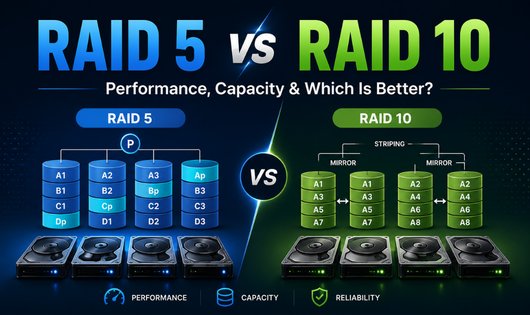
Table of Contents
RAID 5 vs RAID 10: Quick Comparison
| Feature | RAID 5 | RAID 10 |
|---|---|---|
| RAID method | Striping + distributed parity | Striping + mirroring |
| Typical minimum drives | 3 | 4 |
| Usable capacity | (N - 1) × drive size | (N / 2) × drive size |
| Storage efficiency | Higher | 50% |
| Disk failures tolerated | 1 | At least 1; potentially multiple depending on which drives fail |
| Read performance | Very good | Excellent |
| Write performance | Good, with parity overhead | Very good to excellent |
| Parity calculation | Yes | No |
| Rebuild process | Reconstruct data using remaining disks + parity | Copy data from surviving mirror |
| Rebuild load | Generally higher | Generally lower |
| Good for read-heavy workloads | Yes | Yes |
| Good for write-heavy workloads | Less ideal | Yes |
| Good for databases/VMs | Possible, but workload dependent | Usually preferred |
| Cost per usable TB | Lower | Higher |
| Capacity efficiency | Excellent as drive count increases | Always approximately 50% |
The biggest difference is simple:
RAID 5 gives you more usable storage. RAID 10 gives you better write performance and simpler recovery characteristics.
What Is RAID 5?
RAID 5 combines block-level striping with distributed parity.
Data and parity information are distributed across all disks rather than placing parity on one dedicated disk.
A minimum of three drives is normally required.
Imagine a RAID 5 array containing four disks:
- Disk 1
- Disk 2
- Disk 3
- Disk 4
Data blocks are striped across the disks, while parity information is distributed between them.
If one disk fails, RAID uses the remaining data blocks and parity information to reconstruct the missing data.
RAID 5 Capacity Formula
For equal-sized disks:
Usable RAID 5 capacity = (Number of drives – 1) × capacity of the smallest drive
For example, with four 4 TB drives:
Raw capacity:
4 × 4 TB = 16 TB
RAID 5 usable capacity:
(4 – 1) × 4 TB = 12 TB
Approximately one drive’s worth of capacity is used for parity.
Technically, parity is distributed throughout the array rather than being stored on one dedicated physical drive.
What Is RAID 10?
RAID 10, sometimes written as RAID 1+0, combines mirroring and striping.
In a traditional four-drive RAID 10 configuration:
- Disk 1 mirrors Disk 2
- Disk 3 mirrors Disk 4
- Data is then striped across the two mirror sets
This combines the redundancy of RAID 1 with some of the performance advantages of RAID 0.
RAID 10 normally requires at least four disks in a standard implementation, although some software RAID implementations can support layouts that differ from the traditional four-disk arrangement.
RAID 10 Capacity Formula
With equal-sized drives:
Usable RAID 10 capacity = (Number of drives ÷ 2) × drive capacity
For example, four 4 TB drives provide:
Raw capacity:
4 × 4 TB = 16 TB
RAID 10 usable capacity:
4 ÷ 2 × 4 TB = 8 TB
Half of the raw storage is used for mirrored copies.
That 50% capacity efficiency is one of RAID 10’s biggest disadvantages.
RAID 5 vs RAID 10 Capacity
Capacity is where RAID 5 has a clear advantage.
Consider four 8 TB drives.
RAID 5
(4 – 1) × 8 TB = 24 TB usable
RAID 10
(4 ÷ 2) × 8 TB = 16 TB usable
You gain approximately 8 TB more usable capacity with RAID 5 in this example.
With eight 8 TB drives:
RAID 5
(8 – 1) × 8 TB = 56 TB
RAID 10
(8 ÷ 2) × 8 TB = 32 TB
As more drives are added, RAID 5 becomes increasingly efficient in terms of usable capacity.
RAID Capacity Comparison
| Drives | Drive Size | Raw Capacity | RAID 5 | RAID 10 |
|---|---|---|---|---|
| 4 | 2 TB | 8 TB | 6 TB | 4 TB |
| 4 | 4 TB | 16 TB | 12 TB | 8 TB |
| 4 | 8 TB | 32 TB | 24 TB | 16 TB |
| 6 | 4 TB | 24 TB | 20 TB | 12 TB |
| 6 | 8 TB | 48 TB | 40 TB | 24 TB |
| 8 | 8 TB | 64 TB | 56 TB | 32 TB |
These are nominal capacities. The capacity displayed by your operating system may appear lower because storage manufacturers typically advertise decimal TB while many operating systems report capacity using binary units.
Capacity winner: RAID 5
If getting the maximum usable capacity from your disks is the priority, RAID 5 wins easily.
RAID 5 vs RAID 10 Performance
Performance is more complicated than simply saying one RAID level is “faster.”
Actual RAID performance depends on factors including:
- HDD vs SSD
- drive model
- number of disks
- RAID controller
- software RAID implementation
- controller cache
- write-back policy
- stripe/chunk size
- filesystem
- sequential vs random I/O
- queue depth
- application workload
- degraded or healthy state
Still, there are important architectural differences between RAID 5 and RAID 10.
Read Performance
Both RAID 5 and RAID 10 can provide excellent read performance because data is distributed across multiple drives.
RAID 5 can service reads from multiple disks simultaneously.
RAID 10 can also read across multiple mirror pairs, and some implementations can select between mirror members to optimize reads.
For many ordinary file-server and NAS workloads, either RAID level can offer good read throughput.
Read performance winner
RAID 10 generally has the advantage, but the difference can be relatively small for some read-heavy workloads.
You should benchmark your actual hardware if read performance is critical.
RAID 5 vs RAID 10 Write Performance
This is where RAID 10 normally has a much stronger advantage.
Why RAID 5 Writes Are More Expensive
RAID 5 must maintain parity.
For small writes, an implementation may need to:
- Read the existing data.
- Read the existing parity.
- Calculate the new parity.
- Write the new data.
- Write the updated parity.
The exact process depends on the RAID implementation, workload, cache and whether full-stripe writes can be performed.
This is why RAID 5 is commonly associated with a RAID write penalty.
The often-quoted theoretical small-random-write penalty is approximately four I/O operations for RAID 5, but that should not be interpreted as meaning every RAID 5 system will be exactly half or one-quarter as fast as another RAID level.
Modern controllers, caching, SSDs and optimized full-stripe writes can substantially change real-world results.
RAID 10 Writes
RAID 10 does not calculate parity.
Instead, data must be written to both members of a mirror.
This generally results in lower overhead and more predictable write latency than parity-based RAID.
Write performance winner: RAID 10
For workloads that constantly write or modify data, RAID 10 is generally the better choice.
Examples include:
- databases
- virtualization
- transactional applications
- busy mail servers
- VM storage
- frequently changing datasets
- high-I/O application servers
RAID 5 vs RAID 10 Fault Tolerance
This is one of the most misunderstood differences.
RAID 5 Fault Tolerance
RAID 5 can tolerate the failure of one member disk.
If one disk fails, the array normally continues operating in a degraded state.
If another member disk fails before the failed drive has been successfully rebuilt or replaced, the RAID 5 array can no longer reconstruct all of its data.
So:
RAID 5 fault tolerance = one disk
RAID 10 Fault Tolerance
RAID 10 has more complicated fault tolerance.
A four-drive RAID 10 might look like:
Mirror A
- Disk 1
- Disk 2
Mirror B
- Disk 3
- Disk 4
The array can always tolerate one disk failure.
It may also tolerate multiple simultaneous failures if the failed drives belong to different mirror pairs.
For example:
- Disk 1 fails
- Disk 3 fails
The array can potentially continue operating because Disk 2 still contains Mirror A’s data and Disk 4 still contains Mirror B’s data.
But consider:
- Disk 1 fails
- Disk 2 fails
Both members of the same mirror have now failed.
That can result in loss of the RAID 10 array.
Therefore, saying “RAID 10 can survive two disk failures” without qualification is misleading.
A more accurate statement is:
RAID 10 can potentially survive multiple disk failures as long as no mirror pair loses all of its members. In the worst case, a second failure in the wrong disk can cause data loss.
Fault-tolerance winner: RAID 10, with an important caveat
RAID 10 generally offers better failure and recovery characteristics, but it does not guarantee survival of any arbitrary two-drive failure.
If you specifically require protection against any two disk failures, consider RAID 6 or another storage architecture designed for that requirement.
RAID 5 vs RAID 10 Rebuild Time
Rebuild behavior is another major difference.
RAID 5 Rebuild
When a RAID 5 drive fails, the missing data must be reconstructed using data and parity from the remaining drives.
That means the surviving drives participate heavily in rebuilding the failed member.
During this period:
- storage performance can decrease
- surviving disks experience additional workload
- the array has lost its normal single-disk redundancy
- another member failure can cause array failure
The larger the drives and the more data involved, the more important rebuild behavior becomes.
Actual rebuild time can vary enormously depending on:
- disk capacity
- disk speed
- controller
- workload
- RAID implementation
- rebuild priority
- amount of allocated data
- SSD vs HDD
- competing application I/O
Avoid trusting generic statements such as “an 8 TB disk always takes X hours to rebuild.” Real systems differ considerably.
RAID 10 Rebuild
With RAID 10, rebuilding a failed disk generally means copying the data from the surviving member of its mirror to the replacement disk.
Parity does not need to be reconstructed across every stripe.
For this reason, RAID 10 rebuilds are generally simpler and can place less reconstructive work across the entire array.
Rebuild winner: RAID 10
For environments where fast, predictable recovery from drive failure is important, this is a significant RAID 10 advantage.
RAID 5 vs RAID 10 Storage Efficiency
Storage efficiency describes how much of your raw disk capacity is actually available for data.
RAID 5 Efficiency
Formula: (N – 1) ÷ N × 100
Examples:
3 drives: 66.7%
4 drives: 75%
5 drives: 80%
6 drives: 83.3%
8 drives: 87.5%
As the number of drives increases, RAID 5 becomes increasingly capacity-efficient.
RAID 10 Efficiency
RAID 10 provides approximately:
50% storage efficiency
Whether you have:
- 4 drives
- 6 drives
- 8 drives
- 10 drives
half of the raw capacity is consumed by mirroring.
Storage-efficiency winner: RAID 5
This is arguably RAID 5’s strongest advantage.
RAID 5 vs RAID 10 Cost
The capacity difference directly affects cost.
Imagine you need around 24 TB of usable storage using 8 TB drives.
With RAID 5:
4 × 8 TB drives = approximately 24 TB usable
With RAID 10:
You would need:
6 × 8 TB drives = approximately 24 TB usable
RAID 10 therefore requires more raw storage to reach the same usable capacity.
And drive cost isn’t the only factor.
Additional drives may also require:
- more NAS bays
- larger server chassis
- additional RAID controller ports
- more power
- more cooling
- higher-capacity power supplies
Cost winner: RAID 5
When the primary concern is cost per usable terabyte, RAID 5 is usually more economical.
RAID 5 vs RAID 10 for NAS
So which RAID is better for a NAS?
The answer depends heavily on what your NAS actually does.
RAID 5 May Be Suitable For:
- media libraries
- mostly read-heavy file storage
- home file sharing
- archives
- secondary copies of data
- workloads where capacity efficiency is particularly important
For example, a four-bay NAS with four 8 TB drives gives approximately:
RAID 5: 24 TB usable
versus:
RAID 10: 16 TB usable
That capacity difference can be significant for a home NAS.
RAID 10 May Be Better For:
- virtual machines stored on the NAS
- databases
- write-heavy applications
- high transaction workloads
- workloads sensitive to latency
- frequently changing data
- business systems where rebuild characteristics matter
Which is better for a home NAS?
For a basic home NAS primarily storing movies, photos, backups and documents, capacity considerations may make parity-based storage attractive.
However, RAID 5 should not automatically be selected simply because it provides more space.
Drive size, array width, backup strategy and the consequences of downtime or data loss should all be considered.
For larger HDD arrays where you want parity-based protection, RAID 6 is also worth evaluating because it can tolerate any two member-drive failures.
RAID 5 vs RAID 10 for Databases
For databases with significant write activity, RAID 10 is generally preferable.
Database workloads often involve:
- random I/O
- small writes
- frequent updates
- transaction logs
- latency-sensitive operations
RAID 5’s parity updates can increase write overhead.
RAID 10 avoids parity calculation and generally provides more predictable write behavior.
This does not mean a database can never run well on RAID 5. Read-heavy databases and systems with capable storage controllers, caching or SSDs may perform perfectly adequately.
But for write-intensive transactional databases, RAID 10 is usually the safer starting point.
Database winner: RAID 10
RAID 5 vs RAID 10 for Virtual Machines
Virtual machines can generate substantial random I/O.
A virtualization host might simultaneously have:
- one VM installing updates
- another writing database transactions
- another reading application files
- another generating logs
- another using swap
These mixed random workloads favor storage systems with predictable latency.
For this reason, RAID 10 is commonly preferred for busy virtualization storage.
Virtualization winner: RAID 10
For lightly used home-lab VMs, however, RAID 5 may still provide acceptable performance while offering significantly more capacity.
RAID 5 vs RAID 10 for SSDs
SSDs change the performance equation, but they do not change how RAID 5 and RAID 10 fundamentally protect data.
With SSDs:
- latency is much lower
- random I/O performance is dramatically higher than HDDs
- rebuilds can potentially complete faster
- parity calculation and RAID implementation can become more important performance factors
A sufficiently fast RAID controller, CPU or software RAID implementation can make RAID 5 perform very well on SSDs.
However, RAID 10 still avoids the parity-update process.
Therefore, write-heavy and latency-sensitive applications can still benefit from RAID 10 even when SSDs are used.
Do not select a RAID level based only on synthetic benchmark speeds. Consider endurance, failure behavior, capacity and backup requirements as well.
RAID 5 vs RAID 10 With Large HDDs
Large-capacity HDDs make rebuild strategy increasingly important because substantially more data may need to be read or reconstructed following a disk failure.
This does not mean RAID 5 automatically becomes unusable once disks exceed a particular capacity.
There is no universal drive-size cutoff that makes every RAID 5 implementation unsafe.
Instead, evaluate:
- number of drives
- drive capacity
- drive reliability
- workload
- rebuild speed
- controller behavior
- hot-spare configuration
- backup availability
- downtime tolerance
- acceptable probability of data loss
For large, business-critical HDD arrays, comparing RAID 6 vs RAID 10 may be more appropriate than only comparing RAID 5 vs RAID 10.
RAID 6 can survive any two member-drive failures while retaining better capacity efficiency than RAID 10 in sufficiently large arrays.
Does RAID 10 Have a Write Penalty?
Yes, in the sense that each piece of data must be written to multiple physical locations because of mirroring.
A commonly used theoretical model assigns:
- RAID 10: approximately 2 I/O operations per logical write
- RAID 5 small random writes: approximately 4 I/O operations
However, these are conceptual RAID write-penalty models, not guaranteed real-world performance ratios.
Controller cache, SSDs, full-stripe writes, queues and workload characteristics can significantly change observed performance.
Therefore, do not assume:
RAID 10 will always be exactly twice as fast as RAID 5.
Benchmark the actual system whenever performance is important.
RAID 5 vs RAID 10: Example With Four Drives
Consider four 4 TB HDDs.
RAID 5
Raw capacity:
16 TB
Usable capacity:
12 TB
Fault tolerance:
Any one disk
Advantages:
- 75% capacity efficiency
- good read performance
- lower cost per usable TB
Disadvantages:
- parity write overhead
- more involved rebuild
- no remaining disk-failure tolerance while degraded
RAID 10
Raw capacity:
16 TB
Usable capacity:
8 TB
Fault tolerance:
At least one drive and potentially additional drives if failures occur in different mirror pairs
Advantages:
- stronger write performance
- excellent read performance
- simpler rebuild process
- good fit for random I/O
Disadvantages:
- only 50% capacity efficiency
- higher cost per usable TB
When Should You Choose RAID 5?
Consider RAID 5 when:
- maximizing usable capacity is important
- your workload is mostly reads
- writes are relatively light
- you have a small array
- performance requirements are moderate
- the data is properly backed up elsewhere
- you understand the implications of operating and rebuilding a degraded array
Typical examples might include:
- read-heavy file servers
- home media storage
- non-critical archives
- some backup repositories
- modest NAS environments
When Should You Choose RAID 10?
Consider RAID 10 when:
- write performance matters
- low or predictable latency matters
- the workload has lots of random I/O
- faster/simpler rebuild behavior matters
- storage availability is more important than maximizing capacity
- you can afford the 50% capacity overhead
Typical examples include:
- database servers
- virtualization servers
- VM datastores
- transactional applications
- busy application servers
- high-I/O workloads
RAID 5 vs RAID 10: Which Is Better?
There is no RAID level that is universally better.
The right choice depends on what you value most.
Choose RAID 5 if:
Capacity efficiency and lower cost per usable TB are more important than maximum write performance.
Choose RAID 10 if:
Write performance, predictable latency and simpler rebuild characteristics are more important than capacity efficiency.
A quick way to remember the difference is:
RAID 5 = More capacity
RAID 10 = More performance
That is simplified, but it captures the main trade-off.
RAID 5 vs RAID 10 for Different Workloads
| Workload | Better Starting Choice | Why |
|---|---|---|
| Media storage | RAID 5 | Capacity efficiency |
| Home file server | RAID 5 / depends | Often read-heavy |
| Plex/media NAS | RAID 5 / depends | Sequential reads and capacity |
| Backup target | RAID 5 / RAID 6 | Capacity efficiency; requirements vary |
| Database | RAID 10 | Random/write-heavy I/O |
| Virtual machines | RAID 10 | Random I/O and latency |
| Transaction server | RAID 10 | Write performance |
| Archive | RAID 5 / RAID 6 | Capacity focused |
| Heavy write server | RAID 10 | No parity-update overhead |
| Large critical HDD array | RAID 6 or RAID 10 should be evaluated | Greater emphasis on failure protection |
These are starting points, not absolute rules. Always consider the application, hardware and backup design.
What About RAID 6?
If RAID 5’s capacity efficiency appeals to you but single-disk fault tolerance is insufficient, consider RAID 6.
RAID 6 uses dual distributed parity and can tolerate any two member-drive failures.
For equal-sized drives:
RAID 6 usable capacity = (N – 2) × drive size
For example, six 8 TB disks provide:
Raw: 48 TB
RAID 5: 40 TB
RAID 6: 32 TB
RAID 10: 24 TB
RAID 6 therefore sits somewhere between RAID 5 and RAID 10 in the capacity/redundancy trade-off, although its write characteristics differ because it maintains two parity calculations.
If you’re designing a large-capacity HDD array, compare all three rather than automatically choosing RAID 5.
RAID Is Not a Backup
This is the most important point in the entire comparison:
RAID does not replace backups.
RAID protects primarily against certain storage-device failures.
RAID will not necessarily protect your data from:
- accidental deletion
- ransomware
- filesystem corruption
- malware
- application corruption
- theft
- fire
- flood
- catastrophic hardware damage
- administrator mistakes
If an important file is deleted, RAID will faithfully reflect that deletion across the array.
Critical data should have independent backups—ideally including copies that are separated from the primary system.
Frequently Asked Questions
Is RAID 10 better than RAID 5?
RAID 10 is generally better for write-heavy, random-I/O and latency-sensitive workloads. RAID 5 is better when maximizing usable storage capacity and reducing cost per usable TB are priorities.
Neither is universally better.
Is RAID 10 faster than RAID 5?
RAID 10 generally offers better write performance because it does not need to maintain parity. Read performance can be excellent with both RAID levels.
The actual difference depends on the disks, RAID implementation, controller, cache, workload and filesystem.
Which is safer, RAID 5 or RAID 10?
RAID 5 can tolerate any single disk failure.
RAID 10 can always tolerate one disk failure and may survive multiple disk failures if they occur in different mirror pairs. However, losing all members of one mirror results in array failure.
If you require guaranteed tolerance against any two member-drive failures, RAID 6 is worth considering.
How many drives are required for RAID 5?
RAID 5 normally requires at least three drives.
How many drives are required for RAID 10?
A traditional RAID 10 array normally uses at least four drives and typically an even number of drives.
Some software RAID implementations support alternative RAID 10 layouts, so requirements can vary.
Does RAID 5 lose one disk of storage?
Effectively, yes.
The usable capacity of RAID 5 is approximately:
(N – 1) × smallest drive size
Parity is distributed across the array rather than residing on one dedicated parity drive.
Does RAID 10 lose half the storage?
Yes.
Traditional RAID 10 mirrors data, so approximately 50% of raw disk capacity is available as usable storage.
Is RAID 5 good for NAS?
RAID 5 can work well for some smaller, capacity-focused and read-heavy NAS systems.
For large disks, critical data or larger arrays, also evaluate RAID 6 and RAID 10 rather than assuming RAID 5 is the best option.
And regardless of RAID level, maintain separate backups.
Is RAID 10 good for NAS?
Yes, especially when the NAS is used for virtual machines, databases, applications or other write-heavy workloads.
Its main disadvantage is that only about half of the raw capacity is usable.
Is RAID 5 good for databases?
It can be suitable for some read-heavy database workloads, but write-intensive transactional databases generally benefit from RAID 10 because RAID 5 must maintain parity during writes.
Which RAID is better for virtual machines?
RAID 10 is commonly preferred for busy virtual-machine storage because VM workloads often generate random reads and writes and can be sensitive to latency.
Can RAID 10 survive two disk failures?
Sometimes—but not always.
RAID 10 can survive two or more failed drives when the failures leave at least one healthy member in every mirror group.
If both members of the same two-disk mirror fail, the array can fail.
Can RAID 5 survive two disk failures?
No. Standard RAID 5 provides single-disk fault tolerance.
A second member-drive failure before recovery generally results in array failure.
If tolerance against two arbitrary disk failures is required, consider RAID 6.
Final Verdict
The RAID 5 vs RAID 10 decision ultimately comes down to what matters most for your storage system.
Choose RAID 5 when you want:
- more usable capacity
- lower cost per usable terabyte
- good read performance
- storage for predominantly read-heavy workloads
Choose RAID 10 when you want:
- stronger write performance
- predictable random-I/O performance
- simpler disk rebuilds
- storage suitable for databases and virtualization
- better failure characteristics at the expense of capacity
For a four-drive array, the trade-off is particularly easy to see:
Four 8 TB disks
RAID 5 → approximately 24 TB usable
RAID 10 → approximately 16 TB usable
RAID 5 gives you 50% more usable storage in that configuration, while RAID 10 sacrifices that capacity for mirroring, stronger write characteristics and simpler rebuild behavior.
There is therefore no single winner for every system.
For capacity-focused storage, RAID 5 has the advantage. For performance-focused and write-heavy storage, RAID 10 is usually the better choice.
Most importantly, whichever RAID level you choose, remember that RAID is redundancy—not backup.